
How Playback Speed Changes Total Watch Time
Playback speed is the easiest way to change the real time cost of a YouTube playlist without changing the content itself. But people often think about it too loosely. They know “1.5x is faster,” but they do not translate that into the number of hours they will actually need this week.
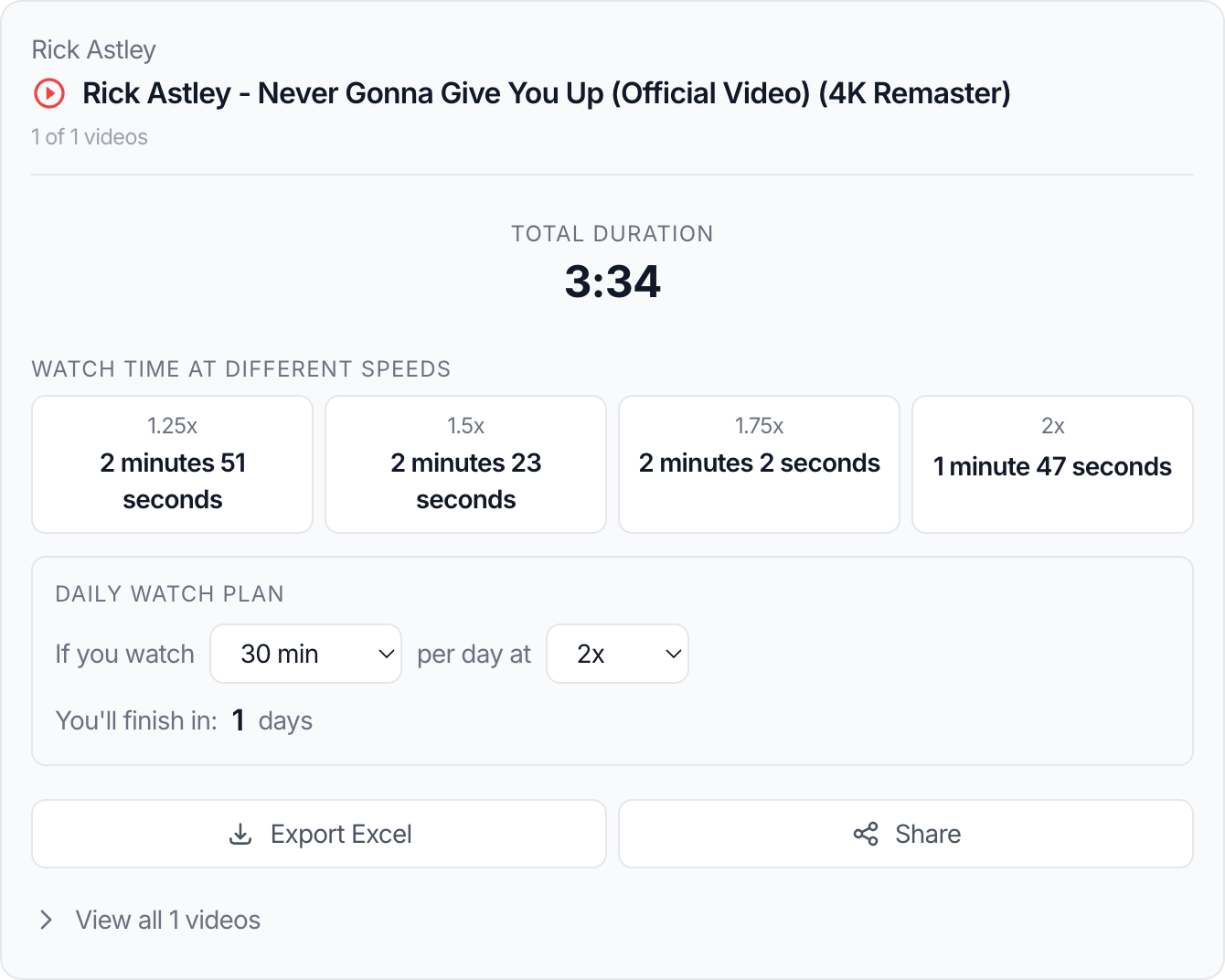
That is why speed-aware watch-time planning matters. A playlist that feels unrealistic at 1x may become very manageable at 1.25x or 1.5x. On the other hand, a playlist that looks easy at 2x may still be too dense to understand properly at that speed. A YouTube Playlist Length Calculator is useful here because it lets you compare those watch-time estimates before you commit.
Why playback speed matters in practice
Speed planning is valuable because total duration alone is incomplete. If a playlist is 14 hours long, the next question is always: “At my real watch speed, how much time do I need to block off?” That is exactly where the calculator becomes more useful than a rough guess.
That matters for:
- online courses
- exam prep
- onboarding playlists
- weekly research review
- internal training
- creator backlog review
The same playlist produces very different planning decisions depending on your speed habits.
Step-by-step: turn raw duration into actual watch time
1. Start with the raw duration
The total duration tells you the full size of the content. This is your baseline.
2. Choose the speed you actually use
Do not pick the most aggressive speed just because it makes the number look better. If you normally slow down dense lectures or pause frequently for notes, a theoretical 2x estimate is not your real watch time.
3. Compare the output at more than one speed
The most useful comparison is usually:
- 1x for full-comprehension learning
- 1.25x for general study
- 1.5x for review
- 2x for familiar or low-density content
4. Add a small buffer
People often forget rewinds, pausing, note-taking, and context switching. That means your true session length is often slightly longer than the pure playback number.
5. Convert the result into a session plan
Once you know the watch time at your chosen speed, divide it by:
- your daily study limit
- your weekly review window
- the deadline you need to hit
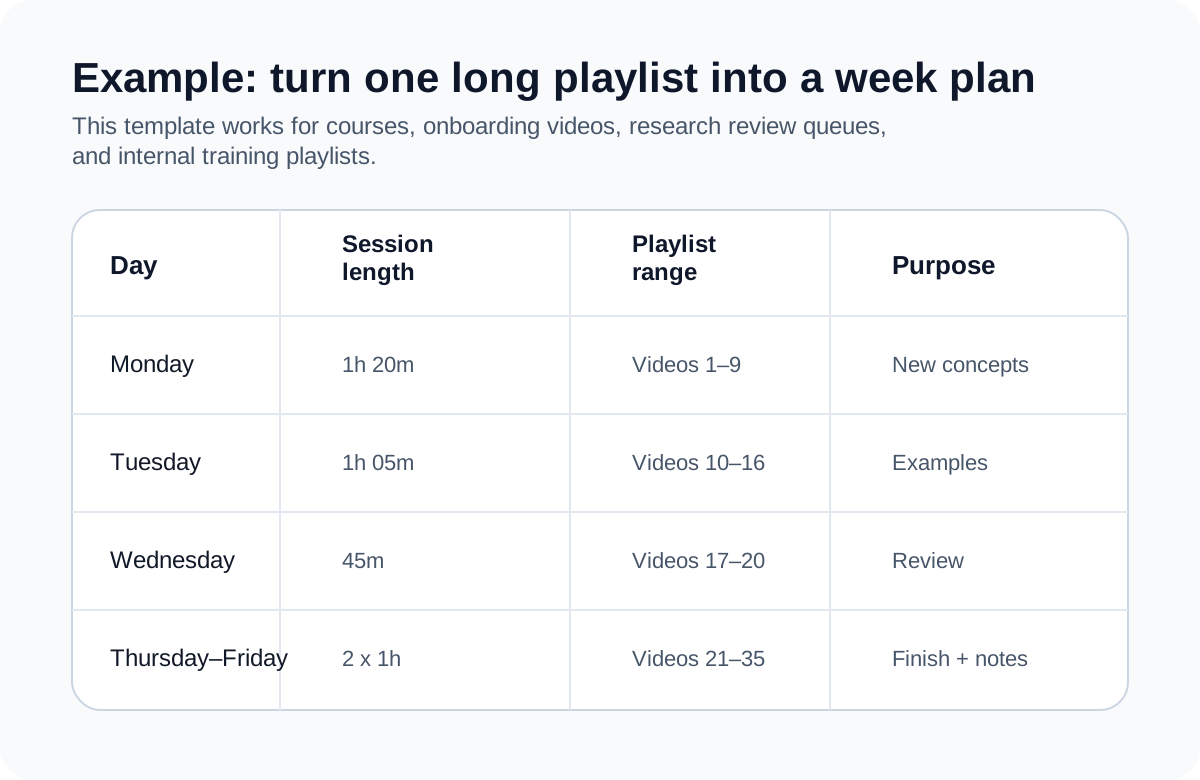
If you need to turn that estimate into a real weekly plan, take the result into How to Plan Study or Work Sessions With Long YouTube Playlists.
A real example
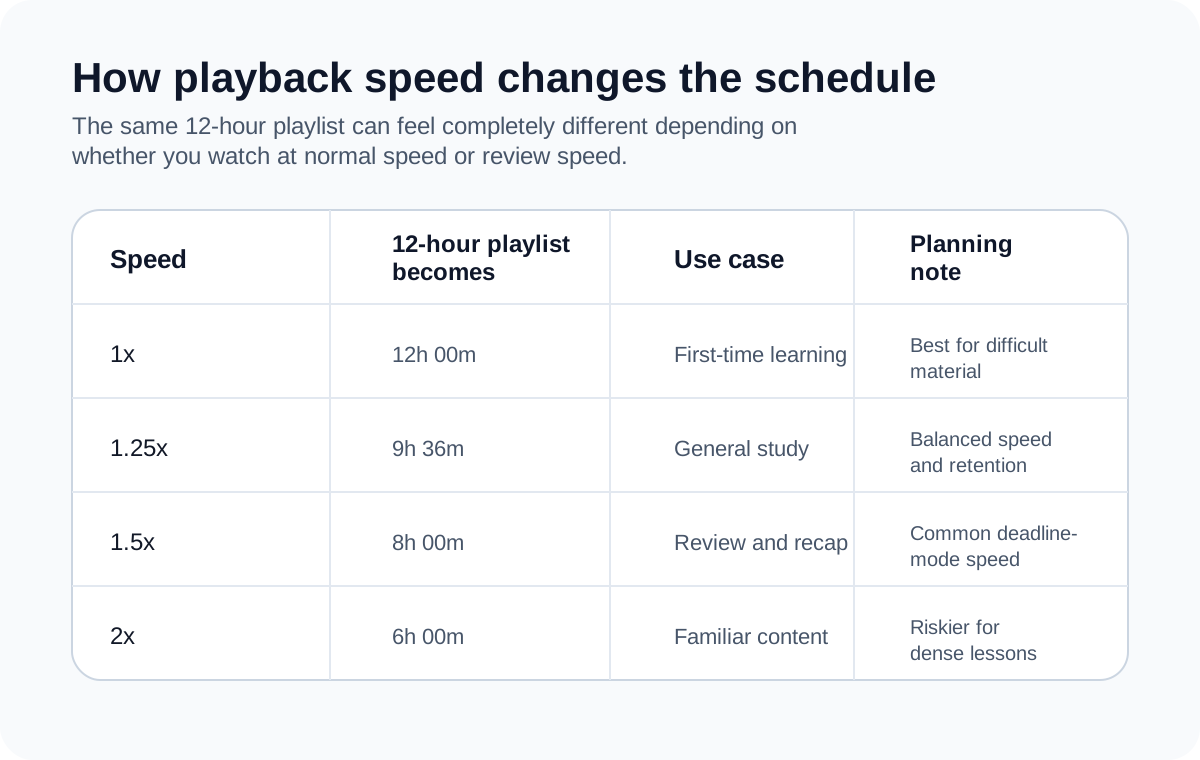
Suppose you have a 12-hour playlist for exam review. If you watch at 1x, that may require two long weekends or several evenings. At 1.25x, the same playlist drops to 9 hours and 36 minutes. At 1.5x, it becomes 8 hours.
That difference changes the planning conversation:
- at 1x, you may need to trim the playlist
- at 1.25x, you can spread it across a normal week
- at 1.5x, you may fit it into a compressed deadline
This is exactly why playback speed belongs inside the calculation, not as a rough guess you do afterward.
When faster playback helps
Faster playback is usually most effective for:
- review sessions
- familiar topics
- recap content
- conversational videos with lots of filler
- playlists you are scanning for key sections
In those cases, speed saves time without destroying the goal of the session.
When faster playback hurts
Faster playback is often a bad planning assumption for:
- new technical subjects
- software walkthroughs you need to replicate
- language learning
- lectures with dense diagrams or formulas
- anything that requires pausing to take notes
This is the difference between watch time and learning time. A calculator can estimate watch time. You still need to decide whether the content type supports that speed.
Common mistakes
Assuming 2x is always optimal
It is optimal for speed, not always for comprehension. Those are separate goals.
Planning with ideal speed instead of normal speed
If you usually watch at 1.25x but build the schedule around 1.75x, your plan is optimistic, not realistic.
Ignoring non-playback time
Study sessions include setup time, context switching, notes, and short breaks. Pure playback is only part of the real session length.
Using one speed for an entire mixed playlist
Some playlists contain intros, interviews, demos, and dense explanations in the same sequence. Real users often change speed by section.
Best practices
- Treat 1.25x as the most practical default for many users.
- Use 1.5x mainly for review or familiar content.
- Add a time buffer when planning anything important.
- Recalculate if you decide to study only a subset of the playlist.
- Match speed to the difficulty of the content, not just the size of the deadline.
Related tools
- Use the YouTube Playlist Length Calculator to compare total time across multiple playback speeds.
- If you need to convert the result into a broader weekly schedule, read How to Plan Study or Work Sessions With Long YouTube Playlists.
- If you are trying to estimate whether a playlist is worth starting at all, read How to Calculate YouTube Playlist Watch Time Before You Start.
FAQ
What is the best playback speed for study playlists?
For many people, 1.25x is the best balance between saving time and keeping comprehension high.
Is 2x speed reliable for all content?
No. It works better for familiar or low-density content than for difficult new material.
Should I use the same speed for the whole playlist?
Not necessarily. Many people slow down difficult sections and speed up simpler ones.
Does faster playback always mean I finish faster overall?
Not always. If you pause and rewind more often at high speed, the effective time saving shrinks.
Why does a speed estimate still feel wrong in practice?
Because real sessions include note-taking, breaks, rewinds, and other overhead that pure playback math does not include.
Conclusion
Playback speed is one of the most useful planning levers for long YouTube playlists, but only when you treat it honestly. The right speed estimate should reflect how you actually watch, what the content demands, and how much buffer your schedule needs.
When you combine total duration, realistic playback speed, and a session-based plan, the watch-time number becomes actionable instead of just interesting.
Continue with
These two guides help you decide whether to start a playlist at all and how to turn speed-aware estimates into a weekly plan.
How to Calculate YouTube Playlist Watch Time Before You Start
Learn how to estimate the real time commitment of a YouTube playlist before you click play, including speed-based watch time and partial playlist planning.
How to Plan Study or Work Sessions With Long YouTube Playlists
Turn total playlist duration into practical daily and weekly study plans for courses, research playlists, onboarding material, or team reviews.